User Journey
The Journey tab gives you a complete overview of a user's registration lifecycle. It is the new default tab that opens when you select a user in User Management, replacing the previous Info tab as the default. The Info tab is still available if you need it.
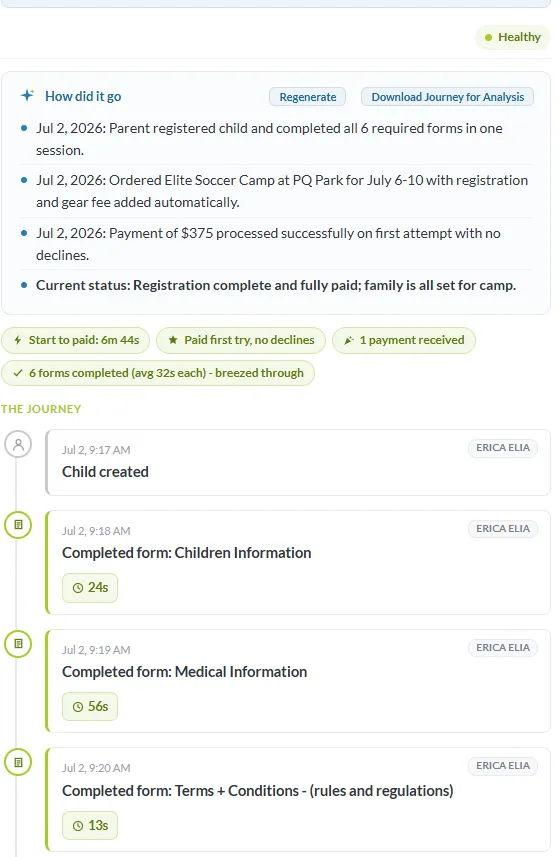
Overview
Journey summarizes a user's registration experience from start to finish, including:
- Cart and product changes
- Sub-unit additions and removals
- Payments and refunds
- Form completion
- Registration milestones
- Overall registration health
At the top of the page, the How did it go? section provides an AI-generated summary of the user's registration, highlighting key events, any issues encountered, and the overall outcome.
Below the summary is a chronological timeline of registration events, such as:
- Time until first payment
- Whether payment succeeded on the first attempt or experienced declines
- Automatic billing activity and collection status
- Forms completed
- Cart updates
- Registration progress and other notable events
Event Details
Each event on the timeline can be expanded to view additional details. Depending on the event, Journey displays information such as:
- What changed
- Whether the action was performed by the user, an administrator, or the system
- Products or sub-units that were added or removed
- Triggered actions and the reason they occurred
- The exact sequence in which related actions were performed
Events are displayed in the order they occurred, making it easy to follow a user's complete registration history from start to finish.
Admin Restrictions
All admins can view the Journey breakdown. However, admins without a financial admin license, or with restrictions on payment details, will not see dollar amounts.
Registration Health
Journey assigns an overall health status to each user so you can quickly identify who may need attention. Available statuses include:
- Healthy – Registration completed successfully with no significant issues.
- Recovered Healthy – An issue occurred during registration, but the user successfully completed the process.
- Needs Attention – The user encountered issues that may require administrator review.
- Struggling – The user experienced repeated difficulties progressing through registration.
- Stopped at Payment – Registration halted during the payment process.
- Browsed, No Add – The user viewed available products but did not add any items.
- No Activity – Little or no meaningful registration activity occurred.
- Abandoned – Registration was started but never completed.
Administrative Actions
From the Journey tab, administrators can:
- Regenerate the How did it go? summary to create an updated analysis.
- Download Journey to export the complete registration history for troubleshooting or to share with AI tools for deeper analysis.