Communication
Understanding the Insights Communication Tab
The Communication tab gives you a high-level view of email activity for your project, so you can see how much outreach has gone out and when. This guide covers what's tracked and where to go for more detail.
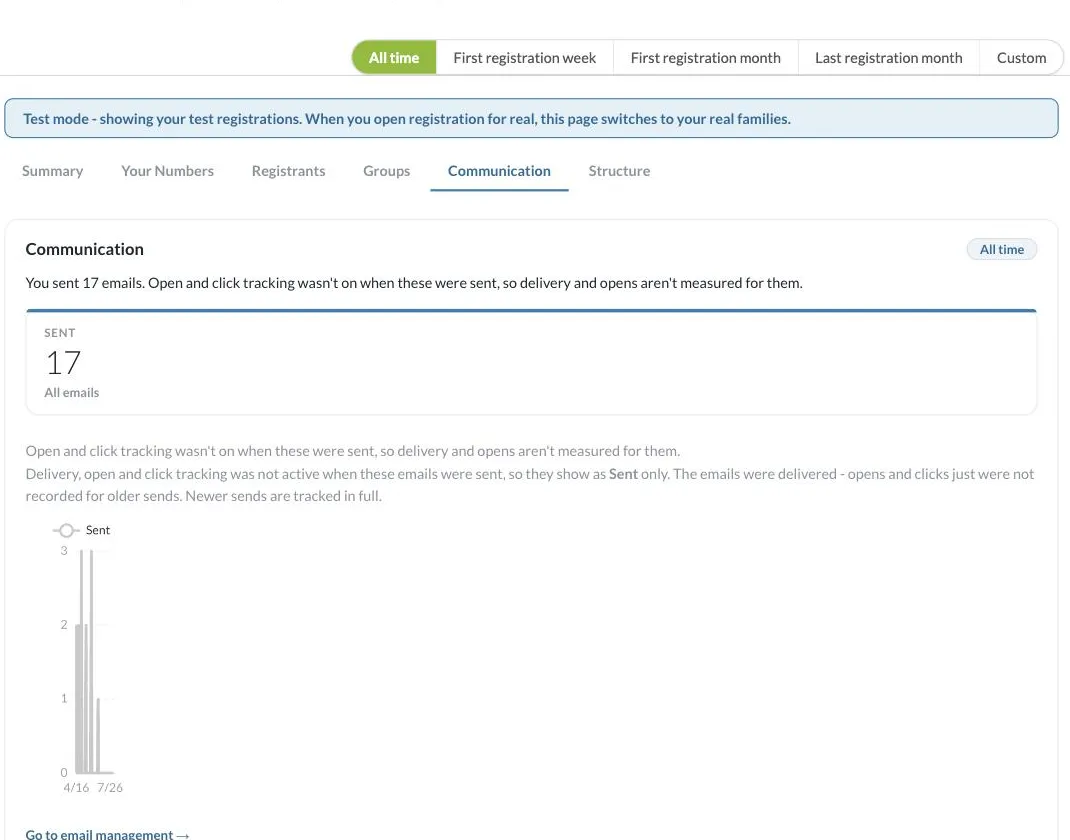
Filtering by Time Period
Every tab in Insights, including this one, shares the same date range selector at the top of the page: All time, First registration week, First registration month, Last registration month, and Custom. Switching this selector changes the data shown across the whole tab, so you can compare a specific week or month against your all-time numbers, or set a custom range with exact start and end dates. Insights also shows you when the data was last calculated, with a Recalculate link if you want to refresh it on demand.
Emails Sent
This section actually surfaces four cards side by side: Delivered, Opened, Clicked, and Sent. Sent reflects the full total for the selected time period, covering all campaign and system emails, while Delivered, Opened, and Clicked are calculated only from emails sent since tracking was turned on for your project. A warning icon appears next to any tracked metric whenever it's based on a smaller sample than the all-time Sent total, as a reminder that the percentage shown doesn't cover every email sent.
Tracking Notes
Open and click tracking only records data from the point it was turned on for your project. Emails sent before tracking was enabled will show as Sent only. Nothing is missing, delivery still happened, but opens and clicks weren't recorded for those older sends. Newer sends are tracked in full. Insights also states how many older, untracked emails exist and the date range they were sent in, so it's clear at a glance why that portion of your history isn't reflected in the Delivered, Opened, or Clicked figures.
Email Trend Graph
The chart plots the number of emails sent over time, letting you spot spikes in outreach (for example, around registration deadlines or event reminders).
Going Deeper
Click Go to email management to view individual email sends, recipients, and full tracking detail where available.
If you have questions about email tracking, contact our support team at [email protected].